Futurised Meta ad review
Your website can look fine while your enquiry form silently loses leads.
In 40 seconds, you’ll see four hidden WordPress issues that can cost enquiries before anyone notices.
Revised video
The repeated numbered eyebrows have been removed. The service label appears only on the opening and closing frames, while Proper Web Care marks the move from problems to the solution.
Video frame contact sheet
Eight key frames from the 40-second video are shown together for quick visual and AI review.
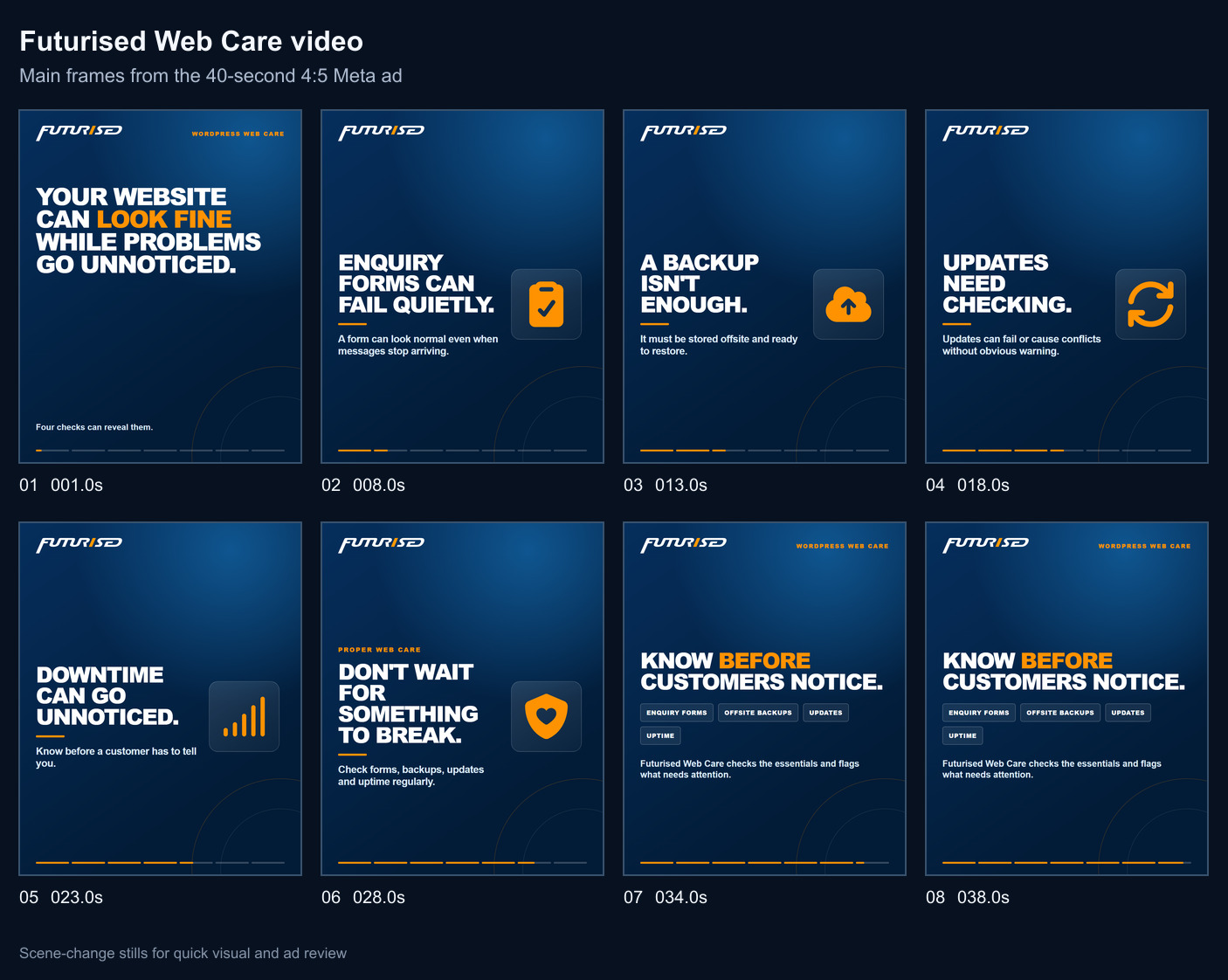
Select the image to open the full-size contact sheet.
Recommended primary text
Your WordPress website can look perfectly fine while your enquiry form stops delivering, your backups are not ready to restore, updates are failing, or downtime goes unnoticed.
Finding out from a customer is too late.
This short video shows four checks that can reveal hidden website problems before they cost you enquiries.
Futurised Web Care checks the essentials and flags what needs attention.
At Futurised, we help Queensland businesses keep their WordPress sites monitored, updated, backed up, and ready when customers visit.
Ad fields
Tracking URL
Primary text alternatives
Use these as separate ad-level variations. Keep the video unchanged so every variation remains tied to the same hidden-problems angle.
Variation 2: question-led
When was the last time someone checked whether your website forms are delivering, backups are stored offsite, updates are healthy and uptime is being monitored?
A website can look normal while these problems remain hidden. Here are four checks worth making.
Variation 3: owner behaviour
Most business owners only look closely at their website when something seems wrong.
Missed enquiries, weak backups, failed updates and downtime are not always obvious from the front of the site. This video explains four areas that deserve regular attention.
Variation 4: customer consequence
Finding out from a customer that your website is down or your enquiry form has stopped working is too late.
Regular checks across forms, backups, updates and uptime can surface problems earlier.
Variation 5: hidden problem
Your website does not have to look broken for something important to be wrong.
Watch four WordPress checks that can uncover missed enquiries, unusable backups, update problems and unnoticed downtime.
Headline and description options
Headlines
- Recommended: Is your enquiry form silently losing leads?
- Your website can look fine while leads go missing
- Find WordPress problems before customers do
- Four hidden WordPress issues to check
- What is your website not telling you?
Descriptions
- Recommended: See four hidden WordPress issues in 40 seconds.
- Find problems before they cost enquiries.
- Forms, backups, updates and uptime.
Build checklist
- Use the revised MP4 and the recommended customer-consequence primary text.
- Select the recommended enquiry-form headline, 40-second description, Learn More CTA and tracking URL.
- Use Queensland broad targeting with the listed exclusions.
- Limit placements to feeds until a 9:16 version exists.
- Create the four video-viewer audiences before launch so engagement starts accumulating immediately.
- Confirm the destination page, Pixel events and URL tracking before activation.
- Keep the ad paused until creative, audience, budget and exclusions receive a final readback.
Next creative project
Build the 2 to 3 minute narrated Power Content video
Keep this separate from the 40-second pilot. The pilot is a short attention and audience-building test. This longer video should teach enough to make a 25% view meaningful, demonstrate how Futurised thinks about website care, and supply the main cold input for the Laurel-style Conveyor Belt.
Angle and promise
Angle family: pain and frustration. Important WordPress problems can remain hidden while the website still appears normal.
Promise: the viewer will learn four practical checks that reveal whether forms, backups, updates and uptime are actually being looked after.
Boundary: keep the A$49 first-month offer for the warm stage. This video should educate first and close with a low-pressure invitation to learn what proper ongoing Web Care includes.
Narrated storyboard
The narration below is a production draft. Read it at a calm pace and leave small pauses for the examples. It should land near 2 minutes 30 seconds without stretching static frames.
The hidden-risk hook
Narration: Your WordPress website can look completely normal and still be losing enquiries, relying on backups that cannot be restored, missing important updates, or going offline without you knowing.
Visual: Start on a polished website. Pull back to reveal four quiet warning indicators. Keep the Futurised logo visible and begin a simple chapter progress bar.
Appearance is not a health check
Narration: Most owners judge their website by opening the home page. If it loads and looks right, they assume everything underneath it is working. But the front of the site does not tell you whether the systems behind it are being checked.
Visual: Split the frame between the public home page and a simple behind-the-scenes checklist. Highlight the gap between appearance and operation.
Check one: enquiry forms
Narration: First, test the enquiry path from beginning to end. A form can show a success message even when the email never reaches the business. A useful check submits a real test, confirms delivery, checks the stored entry, and makes sure replies go to the right address.
Visual: Show a test form submission, a success message, an empty inbox warning, then a confirmed inbox and stored entry. Use demonstration data only.
Check two: recoverable backups
Narration: Second, check the backups. Seeing the word backup in a dashboard is not enough. You need recent copies stored away from the website, a clear retention history, and confidence that the files and database can be restored when something goes wrong.
Visual: Contrast a vague green backup badge with dated offsite copies, database and file coverage, and a verified restore check.
Check three: reviewed updates
Narration: Third, review updates instead of treating them as a single automatic button. WordPress, the theme and plugins depend on each other. Updates need a backup first, a check for known problems, and a review of the important pages and forms afterwards.
Visual: Animate the WordPress core, theme and plugin layers. Show backup, update and post-update checks as a sequence.
Check four: uptime
Narration: Fourth, monitor whether the site is available. The first warning should come from monitoring, not from a customer who cannot load the site. A useful alert also gives someone enough information to investigate quickly.
Visual: Show an uptime timeline, a short outage, an alert reaching Futurised, and an investigation beginning before a customer reports it.
Bring the checks together
Narration: Proper Web Care brings these checks together. Forms are tested, backups are kept and checked, updates are reviewed, and uptime is watched. Problems can then be found while they are still small and before they interrupt the business.
Visual: Bring the four checks into one clear Web Care dashboard. Avoid claims about guaranteed uptime or guaranteed prevention.
Soft close
Narration: If nobody is checking these four areas on your WordPress website, Futurised can show you what ongoing Web Care should cover. Learn more when you are ready.
Visual: Finish with the Futurised logo, the line "Know before customers notice", and a Learn More prompt. Do not introduce several copy or headline alternatives inside the video.
Production approach
- Preferred: Clint opens and closes on camera, with voiceover and animated demonstrations through the middle.
- Faceless is acceptable if it uses a natural voiceover, practical screen examples and regular visual changes.
- Use one idea per scene. Never hold static text merely to reach the target duration.
- Keep captions readable with the sound off.
- Do not use an empty colour frame between scenes.
Assets to prepare
- Final narration recorded cleanly.
- Anonymised form test and inbox example.
- Backup history and restore-check example.
- Update workflow example.
- Uptime alert and response example.
- 4:5 master, caption file, thumbnail and contact sheet.
- A separate 9:16 adaptation before using Reels or Stories.
Matched ad package
Primary text: Your WordPress website can look perfectly fine while your enquiry form stops delivering, your backups are not ready to restore, updates are failing, or downtime goes unnoticed. Finding out from a customer is too late. This short video shows four checks that can reveal hidden website problems before they cost you enquiries. Futurised Web Care checks the essentials and flags what needs attention.
Headline: Is your enquiry form silently losing leads?
Description: See four hidden WordPress issues in 40 seconds.
CTA: Learn More
Keep later copy tests within this same hidden-problems angle. Test materially different executions as separate ads rather than placing multiple hooks or headlines inside one video.
How it feeds the Conveyor Belt
Run this as evergreen cold educational content at the planned A$2 per day. Create 25%, 50%, 75% and 95% viewer audiences before launch. A 25% view of a 2 minute 45 second video represents about 41 seconds of attention, so it can act as the broad entry point to the warm stack. Keep the deeper-view audiences separate for analysis.
The warm campaign can then show education, differentiation, proof when verified evidence exists, and the Web Care offer. Exclude submitted leads and verified current clients where reliable sources exist.
Build order
- Confirm the narration and choose talking-head or faceless production.
- Collect the real screen examples and remove client or personal information.
- Record the full narration before animating so scene timing follows the spoken delivery.
- Build a rough animatic with captions and one useful visual change every few seconds.
- Review the rough cut for clarity, pacing and factual accuracy.
- Render the 4:5 master and prepare the thumbnail, captions and contact sheet.
- Create and verify the four viewer audiences and warm-stack exclusions.
- Build the cold ad as a separate paused ad using the matched package above.
- Check the destination page, tracking, budget, geography, placements and exclusions before deciding to launch.